The Research Intelligence Dashboard
I subscribe to a couple of research newsletters. I was reading neither of them.
JournalClub sends genuinely useful ML papers everyday. TLDR surfaces developer tools I'd never find on my own. My Instagram feed is a firehose of agentic engineering content — new frameworks, workflow demos, tools I've never heard of. The information was out there — reliably, daily, weekly, from sources I trusted. The problem was never supply.
The problem was me, letting it pile up in my inbox unread, knowing that maybe three items out of seventy mattered to something I was actually building — and having no way to figure out which three without skimming all seventy.
Generic summarizers don't help. I tried. ChatGPT can tell you what a paper is about. Perplexity can give you the consensus view. But neither knows that I'm halfway through building a RAG pipeline, that I abandoned a vector database project last month, or that my side project on podcast transcription shares architectural DNA with a paper on speaker diarization sitting unread in my inbox. Relevance is personal. It depends on context that lives in your head — or, if you're an Obsidian user, scattered across a few hundred markdown files you've linked together over the past few months.
The real cost isn't wasted reading time. It's the missed connection: a paper that would have saved you two weeks of implementation, sitting in your inbox while you reinvent its core idea from scratch. You'll never know it happened. That's the worst part.
Then I discovered I could automate the intake. And that changed everything — not all at once, but layer by layer, each one solving the problem the previous layer revealed.
The Archaeological Layers
The system didn't arrive as a grand vision. It started with a simple automation — getting newsletters out of my inbox — and grew the way most useful software grows. Each layer was a reaction to a frustration created by the layer before it.
I'd been using Claude Code for development work when I discovered its scheduled tasks — the ability to set up automated agents that run on a cron schedule. The first thing I pointed it at was my inbox. Every Monday at 7:30am, an agent reads my JournalClub newsletter, downloads the cited papers, writes a synthesis of each one, assesses relevance to my active projects, and outputs the whole thing as structured markdown in my Obsidian vault. Every Friday at 8am, another agent does the same for TLDR — extracting tools, writing an AI signal analysis, suggesting blog angles, and ranking the week's top picks. Not email forwarding. Not summarization. Full agentic review, on a schedule, while I sleep.
2ConnectivityBefore the cron jobs existed, I'd already been using Obsidian as a second brain for my AI agents — linking projects, skills, plan docs, commands, agent configurations. The vault was already dense with links. What I hadn't done was write code that could read those links programmatically. A vault parser changed that — turning the vault from a collection of notes into a queryable knowledge base.
3JudgmentStructured data and connections are necessary but not sufficient. I needed something that could look at a new paper and a project description and answer one question: does this matter? Claude's Haiku model — fast, cheap, roughly a tenth of a cent per call — handles this. Results get cached so the same item never gets re-analyzed. The system went from organized to opinionated.
4The WildcardThe most useful ML tip I got last month came from a forty-seven-second Instagram reel. Not a paper. Not a blog post. A reel. Some of the best agentic engineering content lives on Instagram, and none of it shows up in newsletters. So I built a pipeline that fetches posts from creators I follow, transcribes the audio, extracts structured metadata, and writes it to the vault with wiki-links to relevant projects — the same format as everything else, queryable and connected.
5The LibrarianImagine hiring someone who, every time you add a new subject to the catalog, walks through every book in the library and adds cross-references to the index. That's the Knowledge Linker. When I add a new project or concept to the vault, it goes back through every existing note and connects anything that should be linked but isn't. Notes that had been islands became connected to the mainland. The vault's link density roughly doubled in the first run.
6The RealizationIf every note is a node and every wiki-link is an edge, I'm sitting on a graph. Not a metaphorical graph — a real one. I just needed algorithms that could read it.
The Graph Brain
Obsidian already shows you the graph. It's one of the app's signature features — a visual web of every note and every connection between them. But it's just a visualization. Pretty to look at, useless to query. You can't ask it "which notes are most important?" or "what clusters exist in my thinking?" It's a graph without a brain.
Think of it as a city you built without a plan — thousands of notes connected by thousands of links, with districts and hubs that formed on their own. Obsidian shows you the aerial photo. I wanted to run the city planning department.
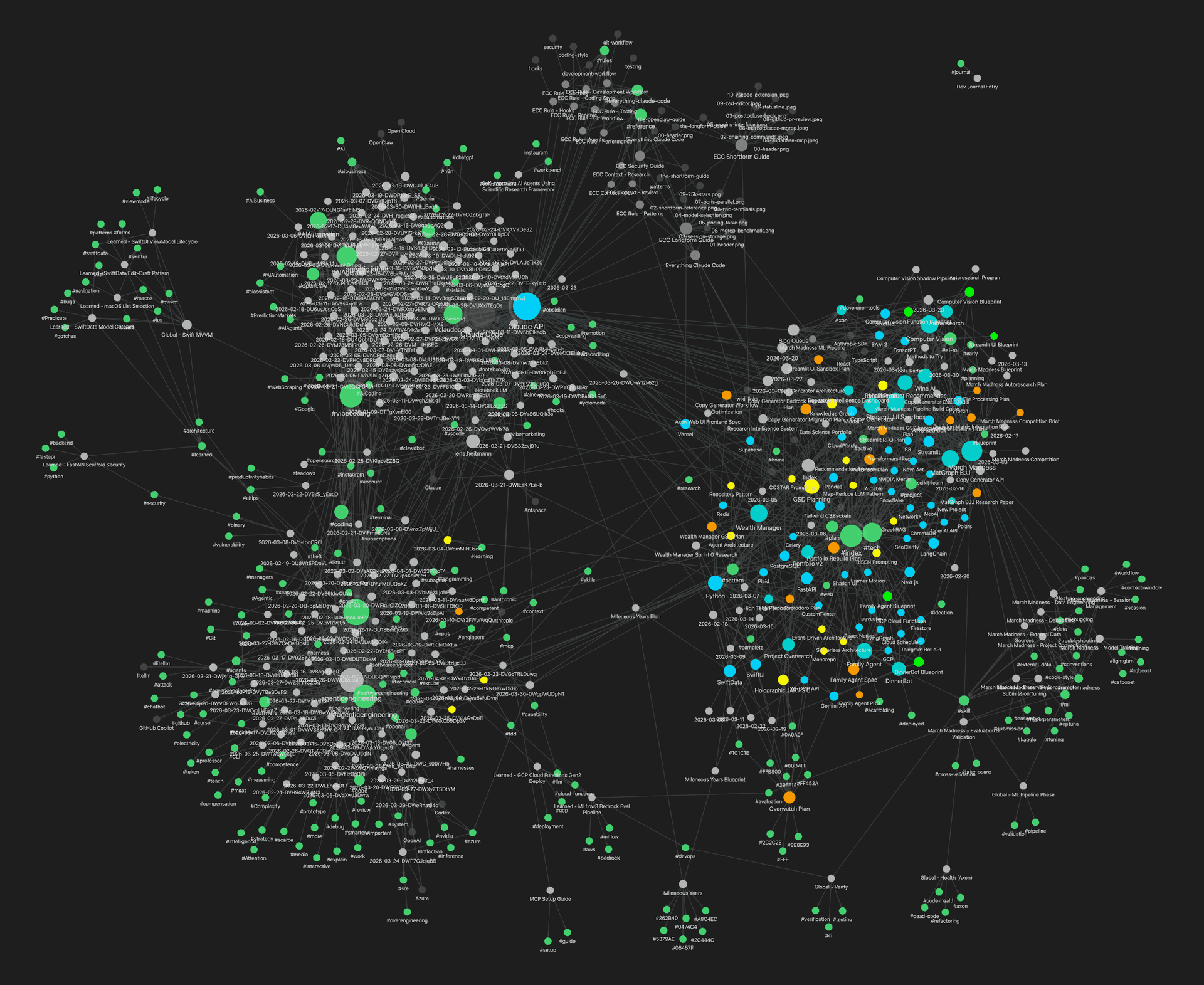
So I loaded the vault into a proper graph engine — the kind used for social network analysis and route optimization — and pointed real algorithms at it.
PageRank: The Weight of a Thousand Small Decisions
The same algorithm that ranked the entire internet works just as well on a few hundred markdown files.
The intuition is simple. Ask every note in your vault "which other notes do you reference?" then rank notes by how many weighted incoming links they receive — giving extra credit for links from notes that are themselves highly linked. That's PageRank. Google's original trick, circa 1998, pointed at your own brain's external hard drive.
PageRank doesn't care what you tagged as important. It doesn't care what you edited recently. It doesn't care what you think your priorities are. It measures what you've organically made important through linking behavior — the accumulated weight of thousands of small decisions about what connects to what. A mirror of your actual intellectual priorities, which often differ from your stated ones.
I discovered this the uncomfortable way. A note I'd forgotten about — a side project on structured output parsing that I'd mentally filed under "maybe someday" — had a PageRank score four times higher than the project I told people was my main focus. I'd been linking to it from everywhere without realizing it. My vault knew what I was interested in before I did.
The centrality rank for each note gets injected into Claude's analysis prompts as graph context. When the system evaluates a new paper against your projects, it doesn't just see the project description. It sees the top five neighboring notes with their PageRank scores — a weighted map of the intellectual neighborhood surrounding each project.
Community Detection: The Serendipity Engine
Drop all your notes into a room and watch who clusters together.
It's the same thing that happens at a party. People who know each other drift into groups. Your ML notes cluster together. Your DevOps notes form their own circle. Your writing projects huddle in a corner. The algorithm — called Louvain community detection — just formalizes what's already happening in the graph. It finds the natural friend groups in your knowledge base.
The payoff is discovery. Say a new paper shows up that has zero keyword overlap with any of your projects — completely different terminology, different field even. But it lands in the same community as one of your projects because they're both connected to the same cluster of notes. The system surfaces it anyway. Not because the words match, but because the neighborhood matches.
Keyword matching finds what you're looking for. Community detection finds what you should be looking for.
The system also predicts missing links — connections that should exist based on the graph's structure but don't yet. It's the graph saying: "you've never linked these two notes, but everything around them is connected."
The graph algorithms feed into a three-tier matching system — explicit links, keyword overlap, and graph-propagated discovery — each layer adding confidence. Any single tier is unremarkable. But stacked together, the system catches things each tier alone would miss. The paper with no keyword overlap that's structurally adjacent to your project. The Instagram reel that landed in the same community as a paper you starred last month.
Finding relevant items is step one. The system can also evaluate them.
The Agentic Research Lab
Fifteen cents. That's what it costs to have an AI agent research a tool, evaluate it against my stack, and write up findings.
When the smart matcher surfaces an item and I flag it for deeper evaluation, it enters the workbench. From there, an agentic pipeline takes over, moving the item through a state machine: queued, researching, researched, then optionally into sandbox creation. Each state transition is tracked, logged, and reversible.
The Research Phase
Claude Opus handles the research, with Sonnet as fallback. The prompt isn't "summarize this paper." It's a COSTAR-structured directive — a prompt framework that specifies context, objective, style, task decomposition, and expected output format. The result is a full research document: what the tool or technique does, how it compares to alternatives, what the integration path looks like for my specific stack, and where the risks hide.
The agent is skeptical by default. If something costs money — if the research output contains words like "subscription," "pricing tier," or "enterprise license" — the system flags it for manual review. I don't want an autonomous agent signing me up for SaaS products.
The Sandbox Phase
For tools and libraries that pass the research phase, Sonnet generates a complete experimental environment: a Dockerfile, an experiment script, and a run entry point. Docker builds the image and runs it with --network none. No internet access. The container gets the code, the data, and nothing else.
The locked lab analogy is literal. Letting an LLM generate and execute arbitrary code is exactly as dangerous as it sounds — unless you put it in a box. The container runs, produces structured JSON output with metrics, and the system validates the output schema before surfacing results. If the experiment fails, it fails inside the box. If it succeeds, I get quantitative evidence — not opinions, not benchmarks from someone else's blog post, but results from my own data.
Most people evaluate tools by reading about them. This system evaluates tools by trying them.
What It Doesn't Do
The system is built for one person's vault, one person's projects, one person's linking habits. It's not a product. There's no onboarding flow, no multi-tenant architecture, no way to plug it into someone else's workflow without rebuilding half the parsers.
The transcription pipeline is a constant source of friction. Whisper hears "Cloud Code" when someone says "Claude Code" — and that's a keyword the entire graph depends on. I maintain a corrections list, but every misspelling that slips through is a broken link the system can't see. The matching is only as good as the data feeding it.
And the graph needs density to work. Below a hundred nodes, PageRank doesn't stabilize. Community detection finds noise instead of signal. The first few weeks of using the system, the recommendations were mostly wrong — not because the algorithms were bad, but because the vault was thin. It got useful around month two. Before that, I would have been better off just reading my inbox.
None of this is fatal. But it matters, because it means the system rewards a very specific kind of user — someone who already links their notes, already curates their sources, and is willing to wait for the graph to catch up. That's a small audience. It might be an audience of one.
What This Could Mean For a Team
I haven't built the team version. But I can't stop thinking about it.
I'm on a Lean AI team. Our job is to deliver AI-based solutions — data science, machine learning, agentic systems, LLMs — to business partners across the entire company. Manufacturing floors. Executive leadership. Supply chain. Finance. Every engagement is different, every domain has its own constraints, and the landscape of what's possible changes weekly. We're a small team expected to stay on the vanguard of a field that moves faster than any team can track alone.
That's the same problem — scaled up.
Imagine every member of the team contributing to a shared knowledge graph. The papers one person reads, the tools another evaluates, the experiments a third runs — all connected, all ranked by relevance to active projects. When manufacturing asks "can AI help us predict equipment failures?" the system surfaces the paper on time-series anomaly detection that a teammate flagged two weeks ago, the tool evaluation that concluded a specific framework fits our stack, and the experiment results from a similar engagement with supply chain.
We go from "let me look into that" to "here are three options we've already tested." That's the difference between a team that reacts and a team that compounds.
I built this because I was drowning in seventy-three unread items on a Monday morning. What I didn't expect was what it would show me about myself.
The system doesn't just surface relevant research. It surfaces your priorities — the ones you actually have, not the ones you tell people about. It reveals which projects I'm actually invested in, which ideas keep pulling me back, which connections I've been making unconsciously for months. The note you keep linking to without thinking. The community your projects cluster into when nobody's organizing them. The connection you'd never search for but your graph already made.
I set out to build a better reading list. I ended up building something that understands what I'm working on better than I do.